

The Export tab turns your book into the files you upload to KDP. The badge on the tab counts print warnings that still need a look.
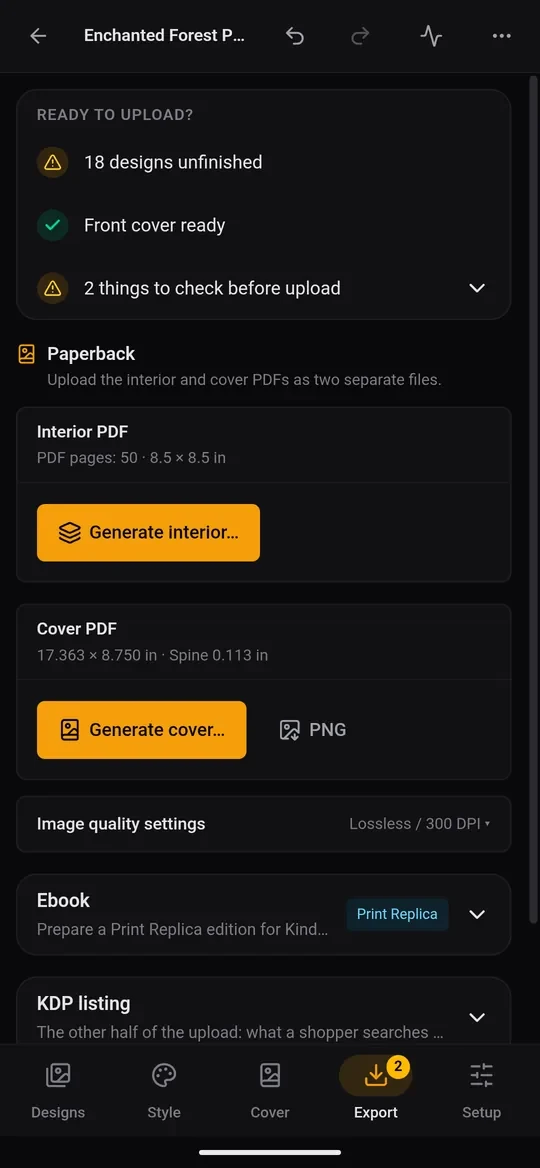
Ready to upload?
The card at the top checks three things:
- Pages: how many are ready, or how many designs are unfinished.
- Front cover: ready, or still needed.
- Print problems: No print problems found, or a list of things to check. Typical ones: fewer than KDP's 24 pages, an odd page count, pages with a prompt but no picture, monochrome pages not traced yet, a border sitting inside KDP's margin (it may be trimmed off), or spine text on a book too thin for it. Tap the line to see them.
Fix anything flagged before you export. Each warning says what to change.
Paperback: two PDFs
KDP asks for the interior and the cover as two separate files.
- Tap Generate interior… and choose where to save it (Downloads or Documents is fine). This is every page in print order, blanks included, at the exact trim size.
- Tap Generate cover… for the full-wrap cover with its spine. PNG also saves a picture of the cover, handy for sharing or checking.
Each file shows Up to date or Out of date. If you change a page or the cover after exporting, generate again so the files match.
Image quality settings let you choose lossless or JPEG pages and the resolution. The defaults suit KDP; change them only if a file is too large.
Ebook
The Ebook panel (paid plan) prepares a Print Replica edition for Kindle: an ebook PDF of the pages you choose (you'd usually leave out blank pages) and a front cover JPEG. Open the PDF in Amazon's free Kindle Create app on a computer, which turns it into the file KDP takes, and upload the JPEG as the ebook cover.
KDP listing
KDP listing holds the text for the other half of the upload: Title, Subtitle, Description, Keywords (7 boxes) and Categories (up to 3). Tap any line to copy it, or Copy all. This panel is also where Publish with KDP lives: it sends the listing and both PDFs to KDP for you (see Auto-publish on KDP with the KDPify browser extension).
Book backup & transfer
Export book ZIP saves the whole book (pages, covers, settings and fonts) as one file, to keep or to continue on another device.