

Name Tracing & Handwriting Worksheet Maker
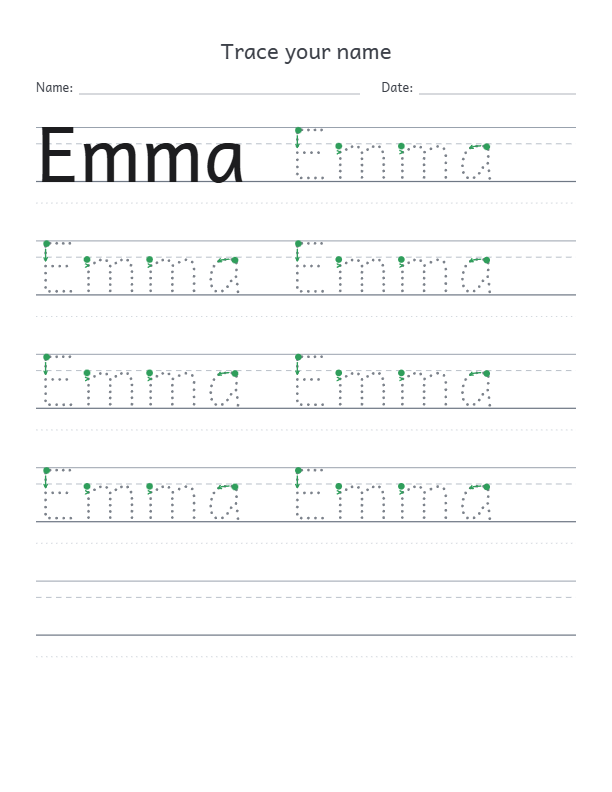
Type a name or a whole class list and get a printable tracing worksheet for each child. Choose dotted, dashed, outline or faded letters on primary handwriting lines, in English or Arabic, then download a print-ready PDF.
Download
PDF and PNG are 300 DPI. SVG keeps vector lines and dots with the fonts embedded.
Loading handwriting fonts…
How to make a name tracing worksheet
- Add names or practice text. Type one name per line for a page per child, or switch to practice lines for letters, words and sentences. Samples include the alphabet, numbers and Arabic letters.
- Pick the tracing style. Choose dotted or dashed centerlines, a hollow dashed outline, faded gray letters or copies that fade from dark to light. Keep a solid model first and add green start dots with arrows.
- Set the lines and the page. Choose primary 4-line, 3-line or baseline guides, the letter size, rows and blank lines. Use US Letter, A4 or the KDP 8 × 10 and 6 × 9 trims with your margins, title, name and date line and picture box.
- Download and print. Save every page as one 300 DPI PDF, or the page you are viewing as a PNG or a vector SVG. Print it for class or add it to a book.
Make a handwriting practice book for Amazon KDP
Name tracing and handwriting books are a steady low-content niche. Pick the 8.5 × 11 or 8 × 10 trim, keep margins of at least 0.5 in and save the whole set as one PDF for the interior. A list of 30 names becomes 30 practice pages in a single download; KDP paperbacks need at least 24 pages.
For a complete book that mixes practice sheets with coloring pages and puzzles, the KDPify activity book maker plans every page and exports interior and cover PDFs at KDP sizes. Download KDPify for Windows or Android to build it.
Name tracing worksheet questions
Is this name tracing worksheet generator free?
Yes. Make and download as many worksheets as you like without an account, payment or watermark.
Can I make worksheets for a whole class?
Yes. Paste one name per line. Each name gets its own page, and the PDF download saves every page in one file, up to 200 names at a time.
Which tracing styles can I choose?
Dotted or dashed centerlines that follow the middle of each stroke, a hollow dashed outline, faded gray letters, or copies that fade from dark to light. Optional green start dots and arrows suggest where each letter body begins.
Does it work with Arabic names and joined letters?
Yes. Arabic is written right to left in Noto Naskh Arabic. The browser joins the letters first and the dotted line follows the connected word, so every letter keeps its correct initial, middle or final form.
What do the handwriting lines mean?
Primary 4-line paper has a top line for capitals and tall letters, a dashed midline for small letters, a baseline and a lower line for descenders such as g and y. Simple 3-line, baseline-only and unlined pages are also available.
Can I use these worksheets in a book I publish on Amazon KDP?
Yes. Pages you create are yours to use, including in books you sell. The fonts use the SIL Open Font License, which allows commercial printing. Choose a KDP trim, keep generous margins and check a printed proof before publishing.
Which files can I download?
PDF contains every page at 300 DPI with the exact page size. PNG saves the page you are viewing at 300 DPI. SVG keeps lines and dots as vectors and embeds the fonts with their licenses.
Are the names I type uploaded?
No. Layout, preview and downloads all run in your browser. Names are not sent to KDPify or saved after you close the page.